Tuesday, April 7, 2020

How to get a Text Browser for Windows 7,10 - Surf the web in text only, no ads


Now that you have extra time to co-read, read fast with a text browser. 


Get a super-fast Text Browser for Windows 7,10 +:
  • Emacs is a well know editor that comes with little know built-in browser 
  • Emacs is superbly supported on all platforms, a staple on UNIX since 1976!

The Emacs Web Browser (Eww) is a very basic and fast text/image browser. Flash and Javascript are not supported which gets rid of ads.

Update 2026 - Now copy and paste a URL an open Emacs in 1-click with my Clipboard Plaintext Power Tool a super productive clipboard history manager app.


Nov 11, 2022 : Update source, use the installer. 

emacs-28.2-installer.exe - download and use installer!   

from  http://ftp.gnu.org/gnu/emacs/windows/emacs-28/emacs-28.2-installer.exe

Older Sources without an installer:

Get latest version GNU EMACS 26.3 (30-Aug-2019) for Windows:


http://mirror.rit.edu/gnu/emacs/windows/

Choose latest:
http://mirror.rit.edu/gnu/emacs/windows/emacs-26/emacs-26.3-x86_64.zip

How to get EMACS Web Browser to work


  1. Unzip emacs-26.3-x86_64.zip  - Compiled Emacs editor with browser
  2. Run EMACS by clicking runemacs.exe in Depends bin directory
  3. In EMACS, choose Tools -> Browse the Web -> 


  4.     Enter your URL or Keywords:

  5. Voila! it works!
Notes:

  1. EWW, the Emacs Web Wowser, is a web browser package for Emacs. See full details here.
  2. Unzipped emacs takes is 758 Mbs, but running takes a scant ~100 Mb of RAM. Unlike Google Chrome taking now a whopping 1.2Gb of RAM now, but equivalent to 1 active chrome instance.
  3. Considered Lynx browser, but builds are never up to date.
  4. To list cookies, Choose Eww -> List cookies

My other Emacs articles of interest: 

How to remove cookies


Open page from command line

Set font size 

Saturday, April 4, 2020

Using Microsoft OneDrive 2020 as Content Delivery Network (CDN) for images

For web developers who are mindful of Page Speed / YSlow scores, finding a free Content Delivery Network (CDN) to load your static content from a cookie-free domain is a nice to have!!!

This is a examination of using Micorosoft OneDrive as a possible CDN. I will test this using
https://onedrive.live.com to hosting a 
 4milliom.png 50.3 KB PNG image.   


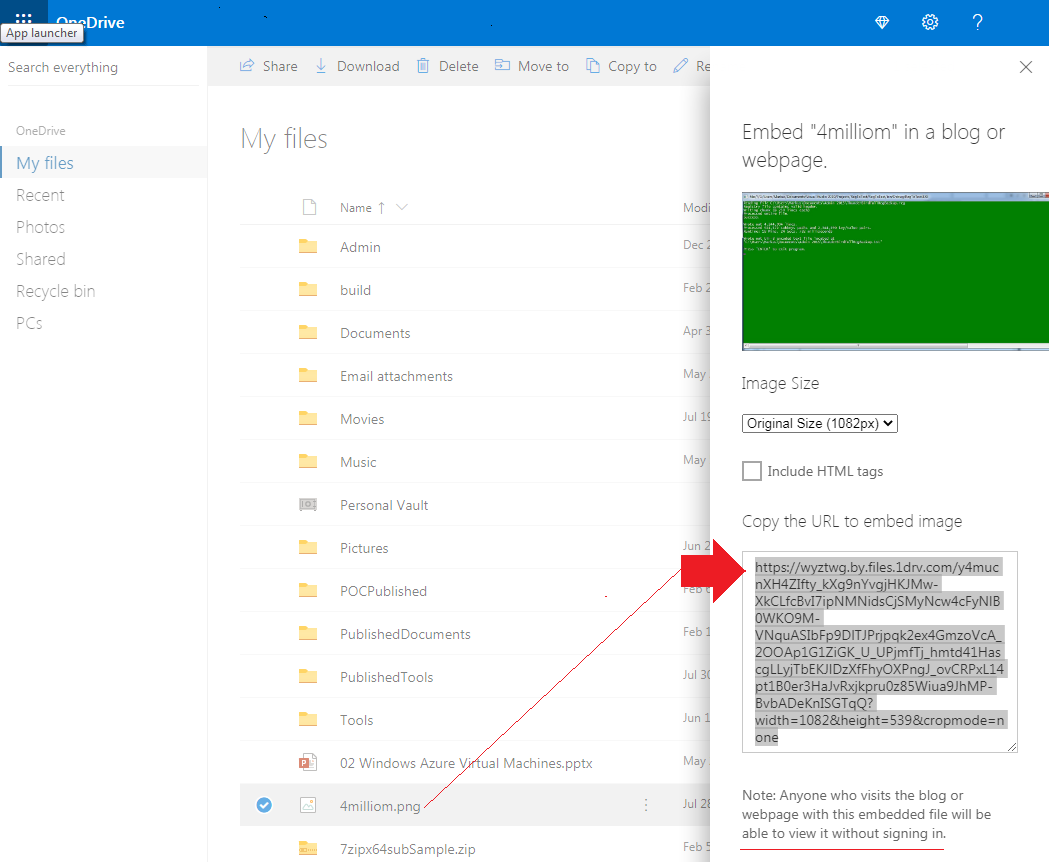
Here's how to get the embed link for a resource on OneDrive. 


For more information on how to get a link to use in your website page for testing, read my blog entry on Microsoft OneDrive Direct File Download URL Maker.


Here's the file URL used in this anaylsis. 

https://wyztwg.by.files.1drv.com/y4mucnXH4ZIfty_kXg9nYvgjHKJMw-XkCLfcBvI7ipNMNidsCjSMyNcw4cFyNlB0WKO9M-VNquASIbFp9DlTJPrjpqk2ex4GmzoVcA_2OOAp1G1ZiGK_U_UPjmfTj_hmtd41HascgLLyjTbEKJlDzXfFhyOXPngJ_ovCRPxL14pt1B0er3HaJvRxjkpru0z85Wiua9JhMP-BvbADeKnISGTqQ

Now lets examine some network timings from Microsoft Edge Chromium Inspect window.


We get 773.03 ms for this transfer, which is very good. Edge reports 5 cookies for this request. Disable cache for successive runs.

Now in Firefox, initial load was 1.3s, and successive load was 566ms. Firefox reports no cookies for this request. 
Disable cache for successive runs.


Conclusion


OneDrive can be used as an effective free Content Delivery Network (CDN) to load your static content. And this is faster than in 2016. 


Friday, April 3, 2020

Phishing Email - Protection From Corona Virus With Immunity Oil

For the record, this is a Protection from Corona Virus with Immunity Oil phishing email attempt that is recently going around.  What to do?  Report them, goto bottom of page.

From : Miracle Virus Oil <appfree0qYX@heroku.com>


Subject
 : 
Protection From Corona Virus With Immunity Oil


PHISHING LINKs;

1. http://u4611801.ct.sendgrid.net/ls/click?upn=xxx

2. http://probyz.xyz/?xxx


How to tell this is a Phishing email?

  1. Check email address in full, if it's not from originating company then it's phishing.
  2. Hover over all links in email, if it's not from the  company's website then forget it.

  3. The best way is to look at message source, see below.

How to examine Email Message Source?

Now lets look at message source
  1. Outlook.com->Actions->View Message Source. 
  2. Gmail.com->More (down arrow to top right)->Show original.
Check for suspicious links, anything that does not originate from original domain like apple.com.


Report Phishing Email (not as Spam)

  1. Outlook.com->Junk (at Top)->Phishing Scam
  2. Gmail.com->More (down-arrow to top right)->Report Phishing 

Report Phishing URLs at Google now 

If you have recievied this email take further action now by click these links

  1. https://www.google.com/safebrowsing/report_phish/


Report phishing at Microsoft and government agencies

  1. http://www.microsoft.com/security/online-privacy/phishing-faq.aspx