Monday, May 5, 2014

How to Get Direct Download Link From OneDrive - WORKING - Power IT Pro Tip


Question
  • Need a direct download link for single file on OneDrive.live.com ? 
  • Do you find the normal OneDrive "Get a link" which bring  you to one drive site an show multiple files a little confusing? (especially for novices)
Solution


Microsoft OneDrive Direct File Download URL Maker


<iframe src="https://onedrive.live.com/embed?cid=8F99649728BEB2F3&resid=8F99649728BEB2F3%211010&authkey=AFo8ZQ_-qj84DEQ" width="98" height="120" frameborder="0" scrolling="no"></iframe>  see instructions below, if you don't know how. NOTE : For images there an extra step below.

https://onedrive.live.com/embed?cid=8F99649728BEB2F3&resid=8F99649728BEB2F3%211010&authkey=AFo8ZQ_-qj84DEQ and populate the textbox below, click "Get Download Link" button.


2. Click on Get Download Link button.
Textbox will be highlighted so you can copy the full link. To copy, right-click and choose  "Copy" or simply (ctrl-c) to copy link. Note: Entire URL is automatic selected for your convenience.


How to get a Microsoft OneDrive Embed Code (see instructions and images below)


  1. Goto OneDrive (https://onedrive.live.com/)
  2. Upload you file

  3. Right-click to "Embed" your uploaded file 

  4. Click Generate HTML Button.

  5. Copy and Paste HTML Code to Notepad

  6. Copy the all the embed code ie. <iframe src="embed link"... >...</iframe> and paste into textbox here


    Click Get embed link button to get the embed link and copy (ctrl-c).
  7. Paste (crtl-v) the file link into OneDrive Embed Link textbox above and click "Get Download Url" button. Proceed as usual.
  8. Right-click and "Copy" or simply press ctrl-c keys to copy the link to your clipboard.
  9. Now Paste (ctrl-v) the OneDrive Share Direct Download Link in emails to share!
  10. Done!

API Change for Images 


  1. Right-click to "Share" your uploaded file

  2. Pop-up will appear and choose "Get a link", click "Create link" dark blue button.
  3. Right-click and "Copy" the highlighted link.  Updated June 07, 2016 API change.
  4. You should get a similar "shortened" url as this

    https://1drv.ms/i/s!AvOyviiXZJmPlSc1CjtKuwc_gqVu

    Paste into https://www.linkexpander.com/ and copy that URL.


  5. Resulting url looks like this  https://onedrive.live.com/redir?resid=8F99649728BEB2F3!2727&authkey=!ADUKO0q7Bz-CpW4&ithint=photo%2cjpg
  6. Paste link into OneDrive Share Link textbox and click "Get Download Url" button.
  7. Right-click and choose "Select all" and "Copy".
  8. Paste the OneDrive Share Direct Download Link in emails instead.
  9. "Shorten link" was a feature in the old API windows now gone, June 07, 2016.  This is done by default now.

  10. OR for image only 
  1. Updated June 07, 2016 API change! Right-click Embed now gives you direct download URL! So you do not need to do the above! 
Google Chrome Warning: Very large PDF files do not preview in Chrome

PDF files approx. over 100Mb in size, do not preview in Chrome, and you get a splash page to "For the best experience, open this PDF portfolio in Adobe Acrobat or Adobe Reader"

You have to save the file first then open in Adobe Acrobat/Reader.


  • https://onedrive.live.com/redir?resid=8F99649728BEB2F3!2737&authkey=!ACnO8wuwLQ07PqI&v=3&ithint=photo%2cgif
It should look something like URL above and must contain the required file id (resid), authentication key (authkey) and file type (ithint). We'll use this link to get a direct file download.


OneDrive for Business File Share Link is the download link by default;)


Bonus : For images, read Using OneDrive as a Content Delivery Network (CDN)

1-Click Installer for Windows Media Taskbar Mini-Player for Windows 7, 8, 8.1, 10


Update 2017
: See my post for an improved installer for Windows 8, 8.1, 10, 10 CU (64-bit), CUF (64-bit) version only.


Getting back Windows Media Mini-Player on Windows 8+, with a one click installer.


Does not show video or visualizations

Windows Media Player 12 version was missing the one of the best features of older Windows Media Players (WMP) and that was the mini-player that appeared when you minimized it. 

The WMP Mini-Player allows you to access the media player right from the Taskbar or system tray area.

Moreover, it displays the currently playing album, artist and provides next song pop-ups. This was a innovative feature, that oddly got removed?  Well, this installer will get it back for you.

Features:
  • Windows Media Player 12 Mini-Player 
  • 1 click install and and proper uninstall - no registry files required
  • Installer works for Windows 7, 8, 8.1,10+ and Server 2008, 2012, 2012 R2, 2016+

What does it install? 

The WMPTaskbarInstaller.inf file is old style (Win95) installer file that installs task-bar Windows Media Mini-Player dll (wmpband.dll) for your computer. The source of the wmpband.dll comes from Windows 7.  


unadulterated file

Install Instructions

Prerequisite:  Your user account must be part Administrators group or you know Administrator password to install.
  1. Download unadulterated file for

    Windows 7,8,8.1,10+ (64-bit) and unzip WMPTaskbarInstaller64.zip

    or 
    Windows 7,8,8.1,10(32-bit) and unzip WMPTaskbarInstaller32.zip.

    To check what version 32-bit or 64-bit of Windows you are running, 
    run this in Command line (CMD.exe) windows;
    1
    wmic os get osarchitecture
    
     
  2. Right-click onWMPTaskbarInstaller.inf and click Install
  3. Click Yes to User Account Control pop-up.

  4. Run Windows Media Player and minimize it.
  5. Right-click on TaskBar, hover Toolbars and select Windows Media Player. 


    Make sure to Uncheck "Lock the taskbar".

    You may not see it appear at first, since explorer process (that contains taskbar process) has to be refreshed. You may try to select another toolbar like
    Links and activate it and deactivate it, repeat, repeat, repeat until Windows Media Payer shows up.

    If that does not work, you'll have to refresh the explorer process, see my post 
    here on doing that.
  6. When you select Windows Media Player toolbar the mini-player appears then you have voila, you have it working! Have fun.


Uninstall

The great thing about this WMPTaskbarInstaller.inf, is it creates a uninstall option.

Goto Programs and Features, and double-click "Windows Media Player Taskbar mini-Player..." to uninstall.


To remove this blog page (only) IE tab on start-up follow http://windows.microsoft.com/en-us/internet-explorer/change-home-page#ie=ie-11. I couldn't remove this key in the registry using inf.


Friday, May 2, 2014

IE FireEye Zero Day Exploit Fix - Adobe Flash Issue Again


Once again, Microsoft is getting the blame for a exploit caused by another company, that being Adobe.

Adobe is well know for very poor coding practices and data governance, it's products are littered with bugs. Adobe Flash has a particular bad security vulnerability history, 316 exploits at last count. Adobe Flash is used by 14.2% of all the websites and declining.

Embedded below is a partial list of Adobe Flash exploits, see website
here for full details of each exploit with a score and are not limited to Windows platform, Mac OS is affected as well.

FireEye the firm that found the bug, (in its own advisory) says the exploit currently is targeting IE9 through IE11 (although the weakness also is present in all earlier versions of IE going back to IE6), and that it leverages a well-known Adobe Flash exploitation technique to bypass security protections on Windows Microsoft’s security advisory credits security firm FireEye with discovering the attack.
ie0daymitigation
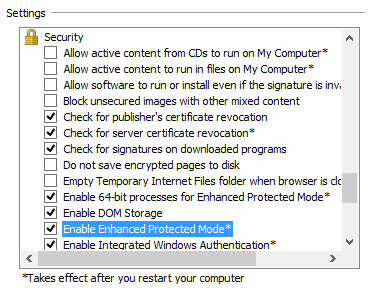
According to information shared by FireEye, the exploit also can be blocked by running Internet Explorer in “Enhanced Protected Mode” configuration and 64-bit process mode, which is available for IE10 and IE11 in the Internet Options settings as shown in the embedded image to the left. 

For, non-expert IE users to download and install its Enhanced Mitigation Experience Toolkit (EMET), a free tool that can help beef up security on Windows. Only, the latest versions which fixes this is are available here.